

Shopping apps become much more important when you are living or staying in another country. They are often where you buy chargers, household items, local SIM accessories, food-related products, and things that are inconvenient to find in person. A Huawei phone can handle that routine well, but it is worth setting up Shopee before you depend on it.
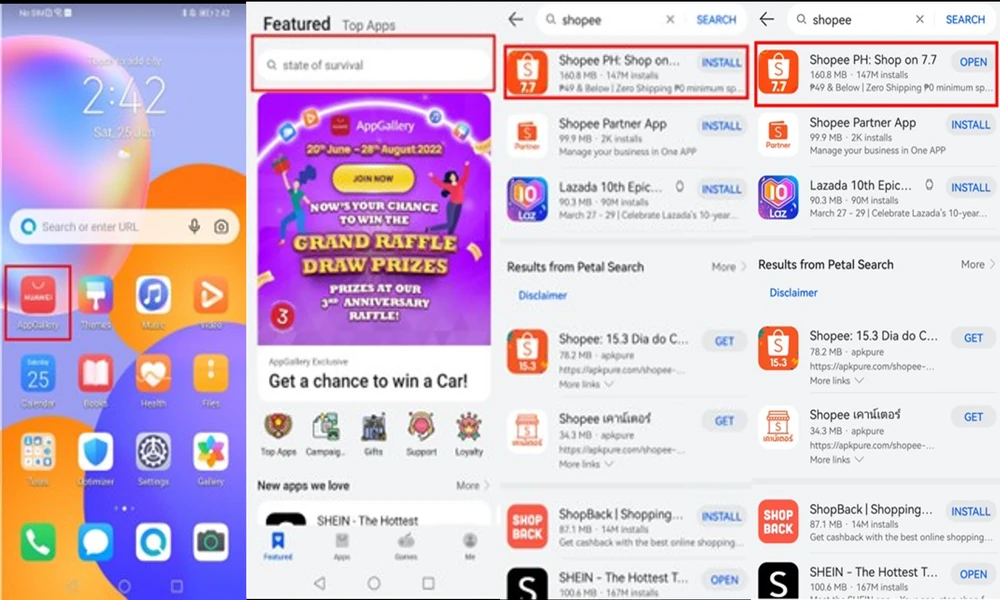
Install the app from the Huawei route
The Huawei Community page for Shopee points users to AppGallery: open the store, search for Shopee, then install and use the app. It is a simple process, and it is usually better than searching the web for an installer.
For anyone searching Huawei Shopee, AppGallery should be the first place to check. Regional availability can change, so use the result shown on the phone you will actually carry rather than following an old screenshot from another market.
Check the account for the country you are in
Once the app opens, review your delivery address, phone number, and account information. Shopping platforms are built around local logistics, so an old address or inactive phone number can cause more trouble than the installation itself.
If you are staying abroad for months, save the address in the format local couriers expect. Include building, unit, landmark, or district details where relevant. A correct address makes delivery tracking and seller communication much easier.
Use a local SIM where verification matters
Some account changes, payment steps, or delivery updates may rely on SMS or app notifications. Make sure the number connected to the account is still accessible. If you change SIMs while travelling, do not immediately remove the old number from every account until the new setup is proven to work.
This is especially important if Huawei Shopee is being used for frequent purchases rather than occasional browsing. A shopping account is much harder to recover when both the phone number and email are out of date.
Watch network and notification behavior
Hotel Wi-Fi, public hotspots, and roaming connections can behave differently from your normal home network. If images, chat, or checkout pages load slowly, switch between Wi-Fi and mobile data before assuming the app is broken.
Also check notification permission and background activity. Seller replies, shipment updates, and delivery alerts are useful only if the phone is allowed to show them.
Keep a browser fallback
If the app has a temporary problem, the official Shopee website can be useful for checking an order or account from a browser. It is not a replacement for every app feature, but it gives you another way to reach basic information without installing another package.
The Huawei Community guide at Huawei Shopee is a good reference for the app-installation side. For overseas use, though, the real goal is broader: a working account, a correct local address, access to verification, and one reliable way to shop even if the app needs troubleshooting.
Do a small test before a bigger order
Before placing an expensive order, try the app with a normal low-value purchase or at least run through the cart and checkout screens. Confirm shipping options, payment choices, seller chat, and order tracking.
That small test tells you whether the whole shopping flow works in your current country, not just whether the app can open. It is a simple habit, but it can prevent a lot of confusion when you are ordering something time-sensitive.
